

Learn how to permanently delete your RealEye account and what happens to collaborators when you close your account.
Steps to Delete Your RealEye Account
- Log in to your RealEye account.
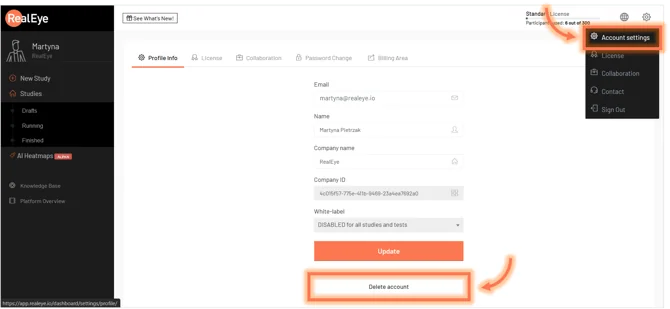
- Navigate to Account Settings.
- In the Profile Info tab, click the "Delete Account" button at the bottom.
- Confirm your decision.
⚠️ Warnings Before Deletion
- This action is irreversible - all account data will be permanently deleted
- Team Collaboration Impact:
-
If you're the only user with Company Manager role:
→ All team member accounts will be automatically deleted
→ All Licenses, studies and data assigned to the team will be deleted after 30 days -
If other managers exist:
→ The License remains active
→ Only your personal access will be removed
-
💌 If you have any further questions, feel free to reach out to our team at support@realeye.io
Was this article helpful?